iSkin - The YAMJ skin for internet connected devices (iOS, Android, or a computer using Chrome or Safari)
iSkin: The YAMJ skin for Internet Connected Devices (iOS, Android, etc)
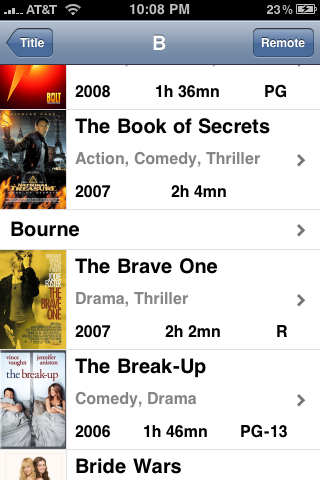
iSkin brings YAMJ to your internet connected devices that have web-kit based browsers. That includes the Apple iPhone, iPad, IPod Touch, Android phones and tablets, and well as computers or laptops that use Google Chrome or Apple Safari.
Browse you video collection on your iPhone, then once you've decided what you want to watch, start watching it on your TV with one final touch, and then control playback using the integrated remote control.
There's are short video demo at The Digital Life Style:
iSkin2
I've been working when I have some spare time on a tablet version of iSkin that makes better use of the larger screen and generally improved performance. The current preview release is discussed here, and I've also made a short screencast of it in action:
New in version 0.8:
- Added FLASH compatibilty (so you can use iSkin with Series 3 NMTs, or Series 2 NMTs using eVersion or NMJ), but still works with Series 1 NMTs
- Removed internal HDD requirement for Series 2 and 3 NMTs. Series 1 NMTs still require an internal HDD.
- Series 2 and 3 NMT support for multi-share, zero-config network paths.
- Updated Readme.html
- Full support of non-iOS web-kit browers.
I developed iSkin to fit my personal needs and preferences, with limited time available. There are probably lots of things that potential users would like to change or add. That's fine. I'm open to suggestions but can't promise I'll incorporate any. Remember, if you are able to use iSkin as I provide it, you have everything you need to create your own version. Feel free to do so.
The latest version of iSkin is always available at Omertron's NMT and PCH Site.
All discussion of iSkin should take place in the iSkin thread at networkmediatank forums. It's the best place to ask questions, request help, or make suggestions.
Information:
iSkin is an HTML skin for YAMJ. It is unique among YAMJ skins in that it is not viewed directly on the NMT. It is viewed on an internet connected device, such as an iPhone, iPad, iPod touch, Android phone or table, or laptop.
In order for this to work, the generated HTML files must be accessible by an HTTP URL from an HTTP server on your home network. An NMT with an internal HDD can be used as the HTTP Server (install the NMT Applications and make sure myiHome is running), but WHS (Windows Home Server), and most file servers and NAS (Network Attached Storage) devices include one or have one or more that can be installed.
Note: iSkin and iSkin2 must be viewed through an http:// url, where the files are loaded by the browser from an HTTP server. Using a file:// URL (directly opening the file from a local drive or mounted network share) will not work.
If you are currently using a YAMJ skin with your NMT, you can use iSkin in conjunction with that skin, but you must run YAMJ twice. Once for the "normal" skin that is viewed on the TV connected to the NMT, and a second time for iSkin.
Requirements:
- An internet enabled device with a web-kit based browser (Apple iPhone, iPad, or iPod Touch; Android phone or tablet; computer or laptop running Google Chrome or Apple Safari) with access to your home network.
- YAMJ. Through out the rest of this document, I'll assume it's installed in C:\YAMJ. If you've installed it somewhere else, you'll have to substitute the actual installation directory where ever you see C:\YAMJ
- A Network Media Tank (NMT)
If you have a Series 1 NMT, it must have:
- An internal HDD (hard disk drive),
- NMT Applications installed with FTP Server running, as required by the NMT Community Software Installer
- PLoNK-a100-csi.0.0.3.zip or newer.
Use NMT Community Software Installer to install the appropriate package on each of your NMTs. From the File menu, select "Install from file..." and follow the instructions.
- An HTTP Server to make the HTML files available for browsing. You have a number of options here:
- If you have an internal HDD in your NMT, you can use the myiHome NMT Application. The document root for the HTTP Server is the root of the internal HDD, and the base URL to the document root will be http://ip.address.of.nmt:8088/stream/file=/share/
- If you have a WHS server, you can use IIS (Internet Information Server). The document root for IIS is C:\Inetpub\wwwroot, and the URL to the document root is http://ip.address.of.whs/
- Most NASes include an HTTP server that you can use. If not, apache, lighttpd or llink are often available. You'll need to figure out what the document root is, as well as the URL to the document root. If you have trouble with this, ask for help in the iSkin thread
- File system access to the document root folder of your HTTP Server, often achieved with an SMB (or NFS) mount. In the rest of this document, I'll refer to this folder as H:.
- If you are using your NMT's internal drive, mount it as H:
- If you are using a WHS, you can run YAMJ on the WHS, and the document root folder will be C:\Inetpub\wwwroot\, and use that instead of H:
- If you are using another file server of NAS, you'll have to figure out what the document root is, and how to access it on your PC. Whatever that path is, use that instead of H: in the following instructions. You'll also need to know the url to the document root.
Instructions:
These instructions assume you've already satisfied the above requirements and verified that each one is operating correctly. Please do not proceed any further unless you have done that.
- Unzip iSkin-0.8c.zip into the skins directory of your YAMJ installation ( C:\YAMJ\skins ). This will create the iSkin directory, next to the other skin directories, such as default, gfb107, gfb107-sd, and sd.
- Open iSkin/Readme.html in your favorite browser.
- Follow the instructions.
Please help support further iSkin development. 
Credits
iSkin wouldn't be possible without the efforts of
- The YAMJ developers
- The iui developers
- The MediatankController for iPhone developer
- The iscroll.js developer
- The PLoNK developers
To Do List
Here is a list of the things I plan to work on at some time in the future
- Make better use of larger iPad screen with some sort of split-screen navigation.
Change Log
- Version 0.8c
- Rework documentation to have less iOS focus.
- Version 0.8b
- Fixed scrolling of the integrated remote in non-iOS browsers
- Version 0.8a
- First pass at full non-iOS browser support
- Added skin-theme option
- Version 0.8:
- Added FLASH compatibilty (so you can use iSkin with Series 3 NMTs, or Series 2 NMTs using eVersion or NMJ), but still works with Series 1 NMTs
- Removed internal HDD requirement for Series 2 and 3 NMTs. Series 1 NMTs still require an internal HDD.
- Updated Readme.html
- Version 0.7c
- Disable wrapping of long set titles, and add ellipsis when title is truncated
- Set mjb.nbThumbnailsPerPage=20 (down from 10,000) in skin.properties. This controls the number of movies/sets initially loaded when you click on an index. If the index contains more than this many, the last link will be a "Load 20 more..." link to load the next set and add them in the list. This reduces memory usage and improves the load time and scrolling performance for long lists. You may change this value as you see fit for your own use.
- Other minor fixes to keep up with recent versions of YAMJ
- Version 0.7
- Improved iPad support (use full screen)
- Improved support for WebKit based PC browsers (tested on Google Chrome and Apple Safari).
- Added skin-doneURL option to skin-options.xsl to set the URL loaded on the NMT when a video stops playing.
- Version 0.6
- Fix play all links
- Make the header bar fixed by integrating iscroll.js
- Add lazy loading of thumbnails on the index pages
- Use the remote control from MediatankController
- Add support for C200 by switching to PLoNK-csi from MediatankController for iPhone
- Add support for multiple NMTs. Requires special care to make sure all NMTs can access all videos in your library using the same NMT path.
- Readme.html updates
- Updated screen captures
- Version 0.5a
- Updates for MediatankController 1.0 for iPhone
- Fix for trailers/extras
- Fix for file names containing single quotes. Will not work with double quotes.
- Readme.html updates
- Version 0.5
- Fix episode/multi-part support
- Unbundle MediatankController, now using the official version.
- Added Readme.html
- Put mjb.detailsDirName in skin.properties so users don't have to change it.
- Version 0.4
- Fixed playback of .iso/VIDEO_TS
- Version 0.3
- Fixed cast when cast indexing is turned on.
- Show director when director indexing is turned on.
- Version 0.2
- Enable full-screen mode when iSkin is started from the Home Screen icon.
- Version 0.1
- Initial release


| Attachment | Size |
|---|---|
| iSkin-0.8c.zip | 672.85 KB |
| iSkin2-preview6b.zip | 16.01 MB |
| iSkin2-preview7.zip | 17.37 MB |
| iSkin2-preview8.zip | 17.39 MB |